Premium Desktop OS for Coaches
BBH Coach OS — a complete business system for personal trainers
The Excel-to-calendar tool has grown into a native Windows desktop application: members, plans, calendar generation, weekly check-ins, finances and a gamified ranking system — all in one offline-capable installer, built with Electron, Next.js 15 and TypeScript.
Project Overview
From a weekend script to native coaching software
The first version of this project — still part of the portfolio — was a single tool that generated a Google Calendar week from an Excel sheet. BBH Coach OS develops that workflow from start to finish: seven working modules, a curated food and exercise database with live macro calculations, Excel import and persistent data storage — entirely local, without a cloud service.
Dashboard, members, plans, calendar, check-ins, finances and rankings — fully connected.
Electron 33 + Next.js 15 in an NSIS installer (~156 MB). Double-click to get started.
A Zustand store persisted in localStorage. No cloud sync or external service.
SheetJS automatically detects meal-plan and workout layouts. Templates can be downloaded directly from the interface.
Workflow
From a new member to a complete training week
The app brings the entire weekly cycle into one interface, reducing the need to switch between Excel, notes, messages and a calendar. Each step has its own view, and all views share the same data store.
-
01
Create a Member
Profile, measurements, goal, subscription status and coach notes. A unique BBH code is assigned automatically.
-
02
Build or Import a Plan
Create a meal or workout plan in the weekly editor, or import and name an Excel plan.
-
03
Assign the Plan
Assign a plan to a member. Any previous assignment is replaced atomically, and the counts in both plans are updated.
-
04
Generate the Calendar Week
Combine meal and workout plans, review the preview and generate calendar files for individual members or in a batch.
-
05
Review a Check-in
Review weekly results, adherence, mood and photo evidence, then send feedback using quick-reply templates.
-
06
Review the Business
Track finances, payment status, expense categories and the gamified ranking of all members.
01 / Coach Dashboard
The morning overview — KPIs, top performers and the monthly target
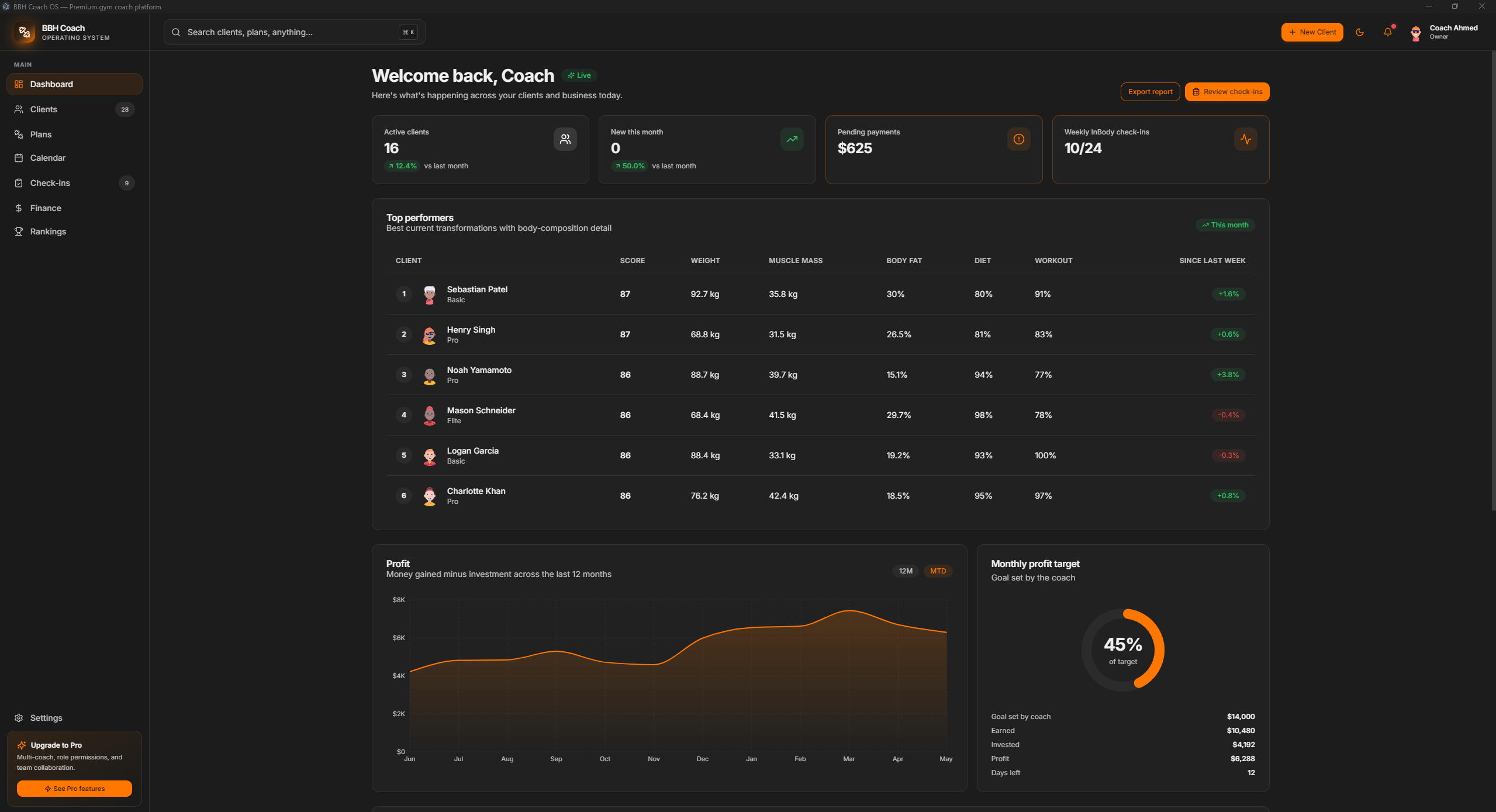
Four KPI cards at the top show active members, new members this month, outstanding payments and this week’s check-ins. Below them, a live leaderboard shows top performers with their scores, adherence and streaks. A 12-month profit chart and radial monthly-target indicator complete the view, all calculated live from the data store.
02 / Member Management
Detailed member management — list, profile, history and coach notes
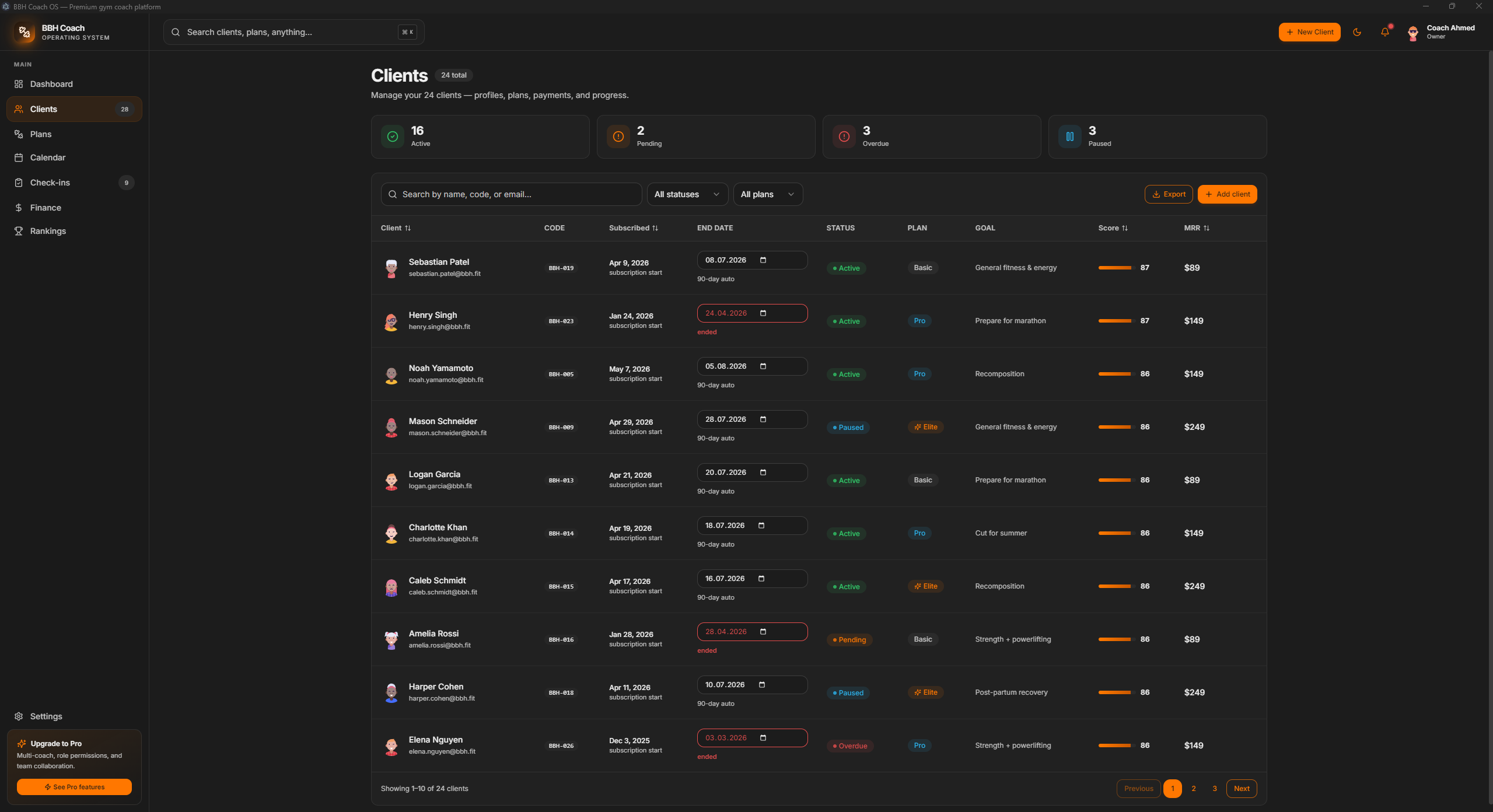
The member list is a practical working table: filter by status (active, pending, overdue or paused) and search by name, code or email. A click opens the detailed profile with historical body composition, weekly adherence, assigned plans, billing status and editable coach notes.
View the detailed profile
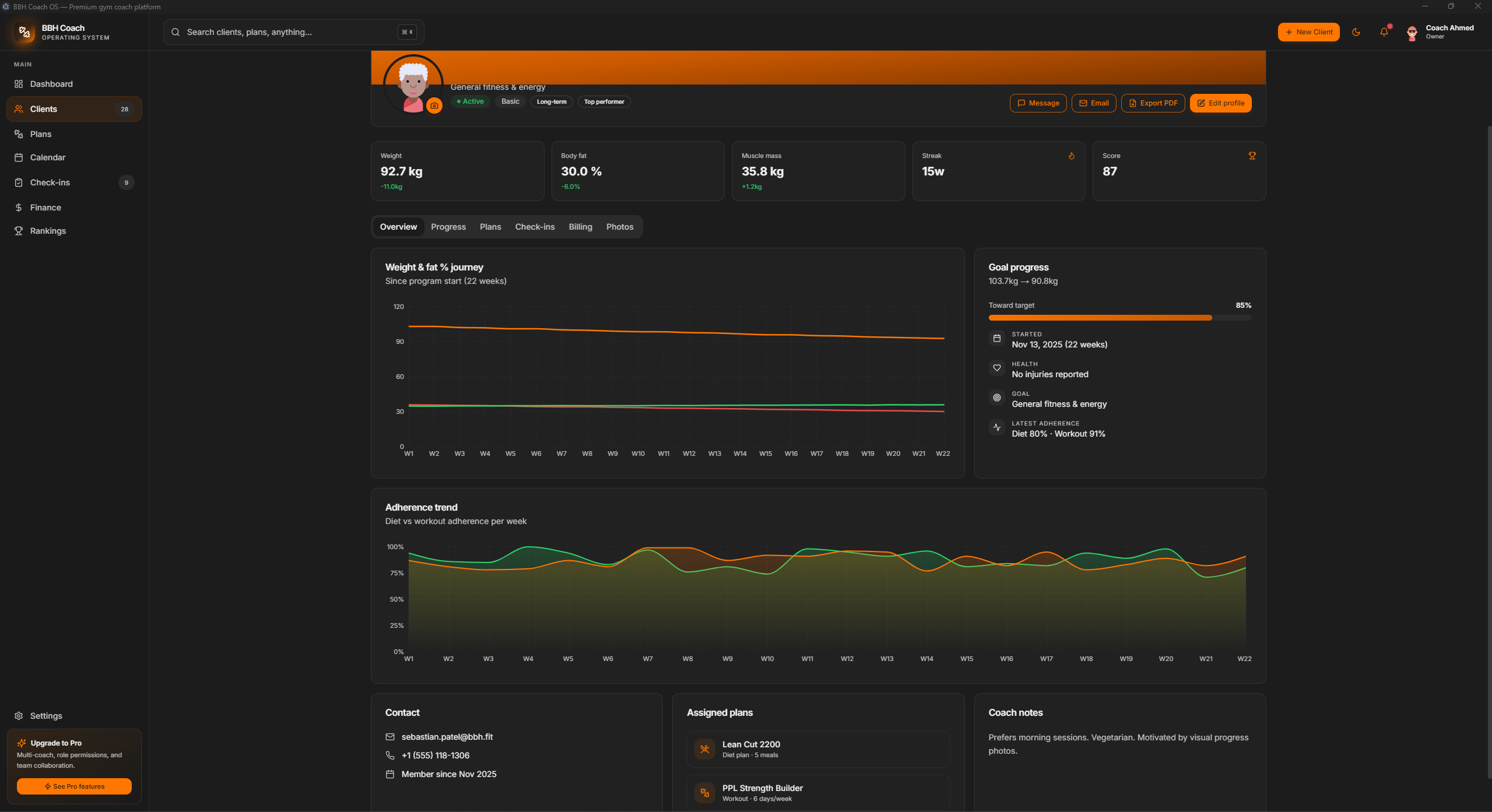
The detailed profile shows the member’s full history: weight and body fat since week one, weekly adherence trends, a goal progress bar, current plans and coach notes — all in one view.
03 / Plan Library & Editor
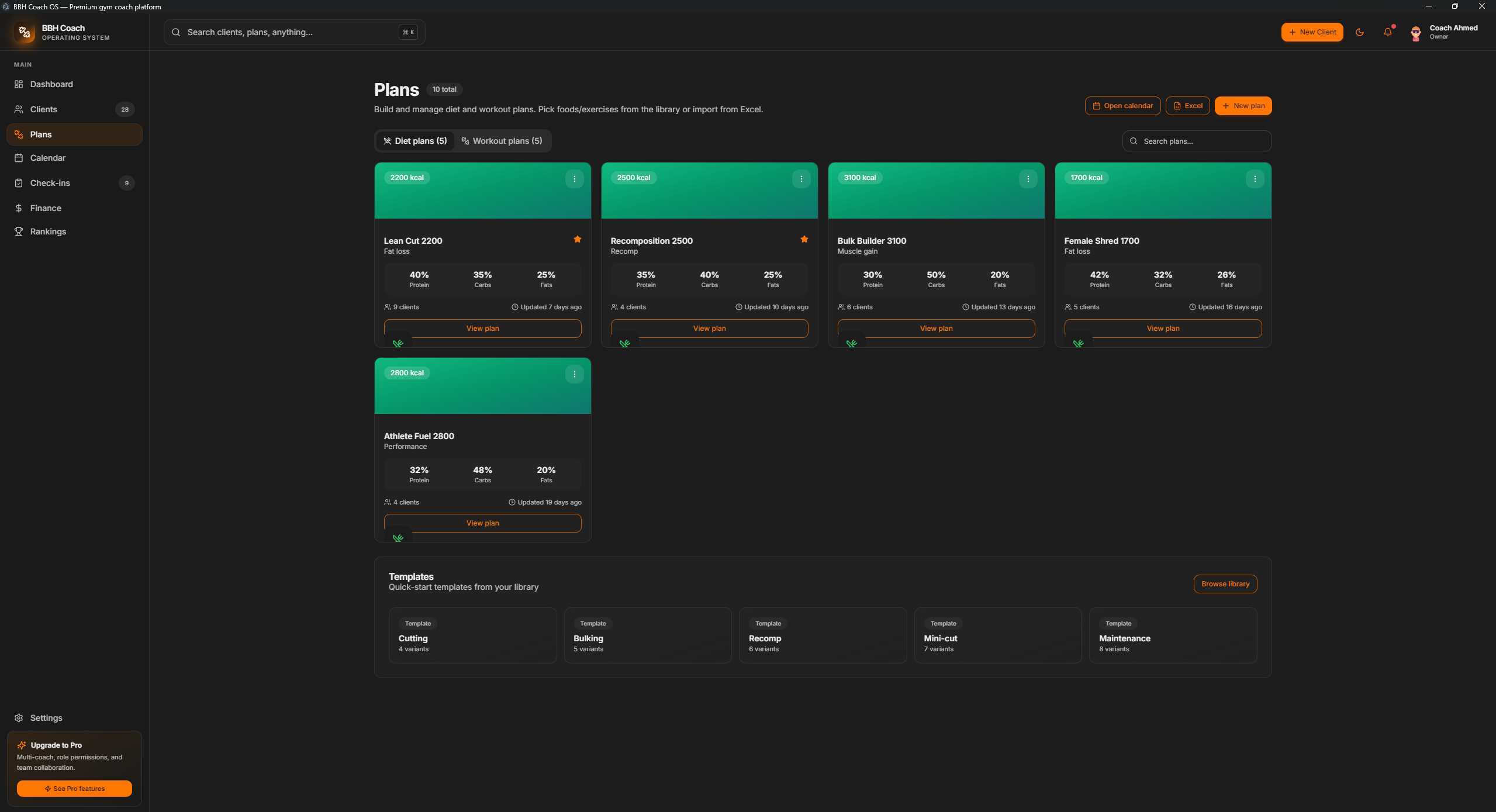
A plan editor with live macro calculations
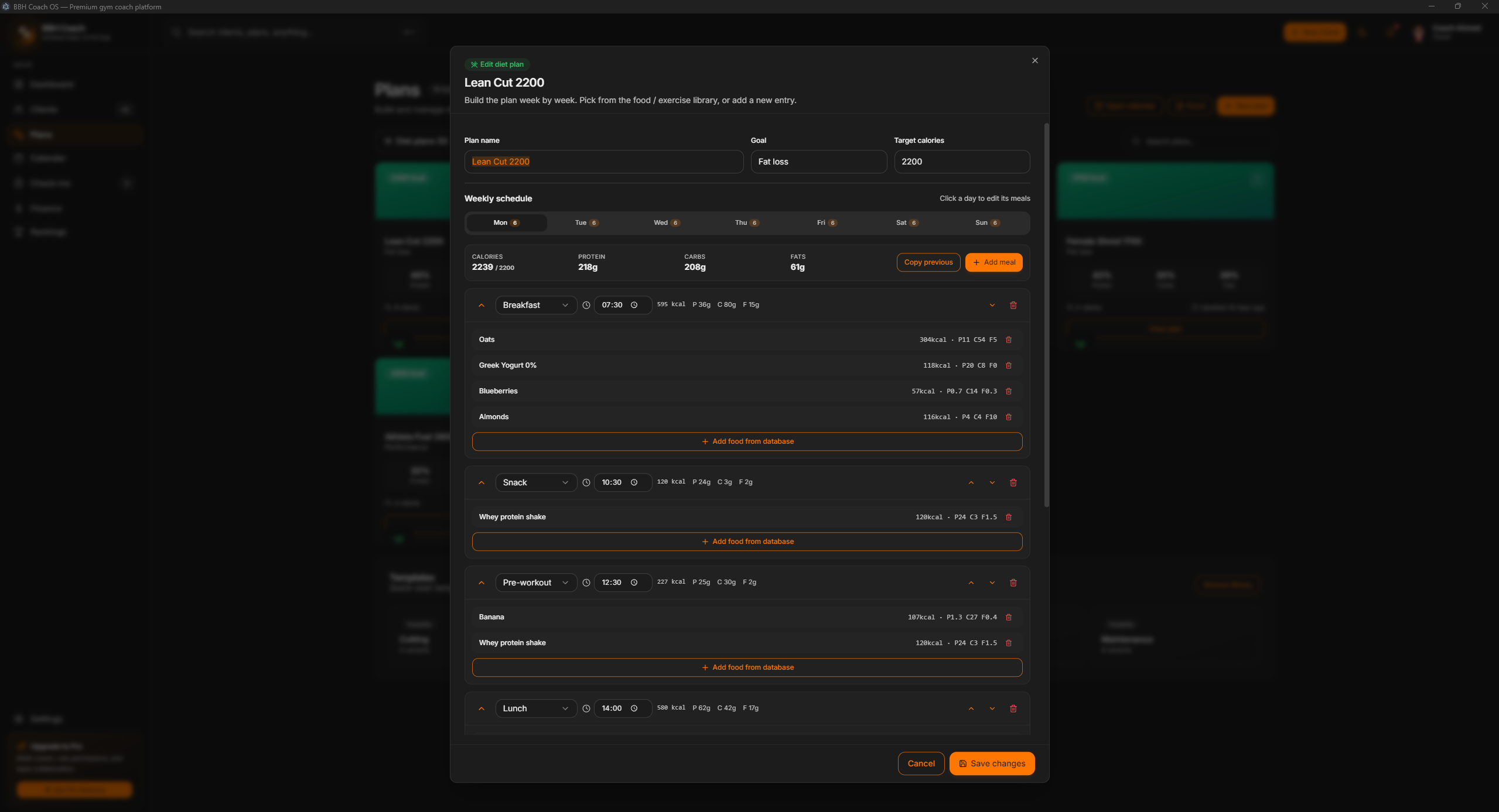
Meal and workout plans share one library. Each plan opens a day-by-day editor from Monday to Sunday, where the coach selects foods from a curated database and enters quantities; the app immediately calculates calories and macros. New foods can be added at any time, with a built-in Google lookup. Workout plans follow the same pattern with sets, repetitions, intensity and tempo.
View the editor and food database
The editing dialog shows seven daily tabs and the number of meals for each day. Foods are selected from the database for each meal; totals for calories, protein, carbohydrates and fat update live and are compared with the daily target.
04 / Calendar Generation
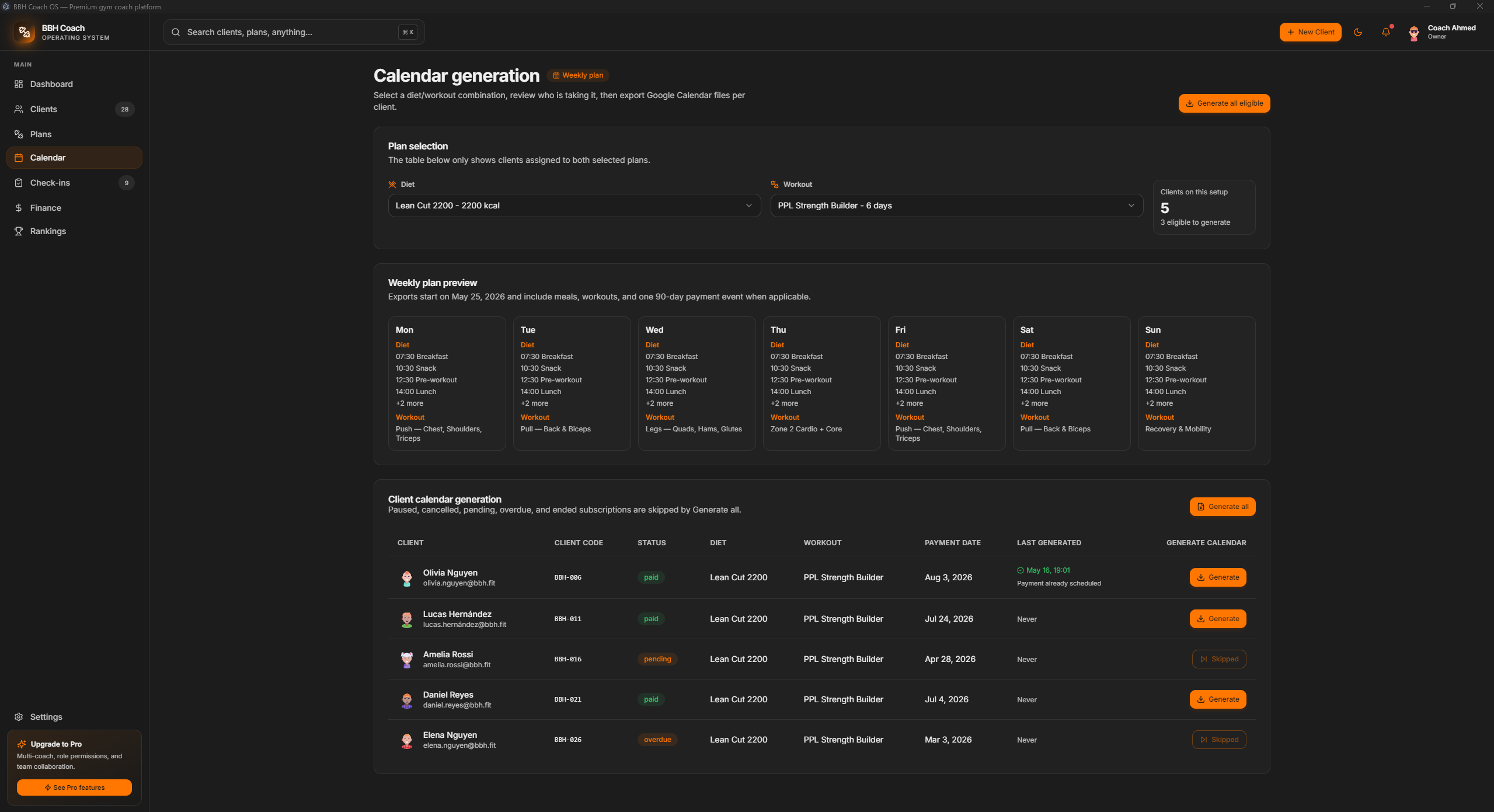
One meal plan + one workout plan = a shareable week
The original project’s core workflow, rebuilt as a native app. The coach combines a meal plan and a workout plan, immediately sees every member assigned to that combination, reviews the week day by day and generates calendar files individually or in a batch. Payment due dates are included as events at the same time.
05 / Check-ins
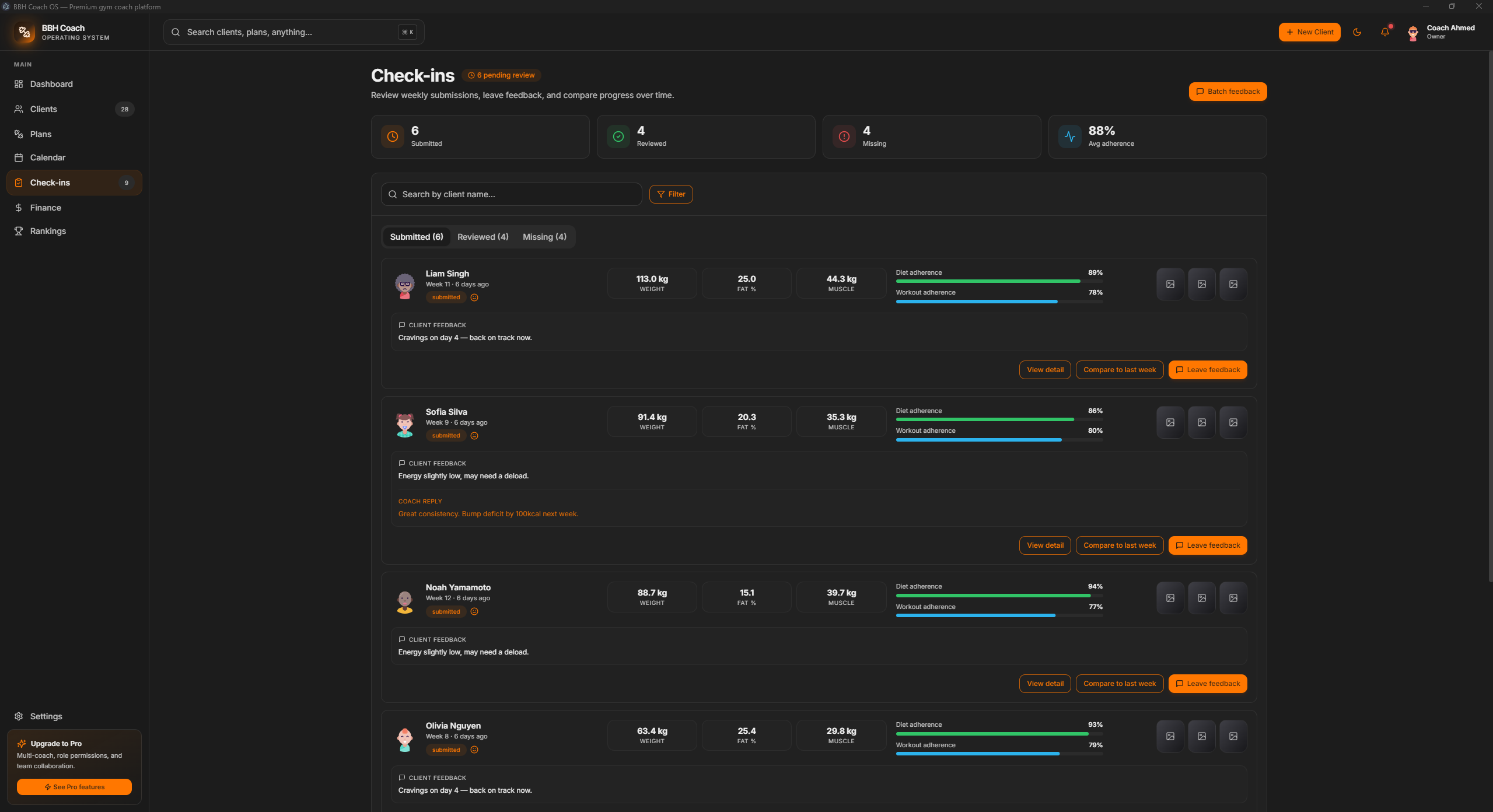
Review weekly results and give feedback
Each week, the app organises submissions into Submitted, Reviewed and Missing tabs. Each entry shows weight, body fat and muscle mass, two adherence bars for diet and workouts, mood, the member’s notes to the coach and photo evidence. The feedback dialog includes quick-reply templates for common responses and automatically marks an entry as reviewed when feedback is sent.
06 / Finances
The financial side of the coaching business
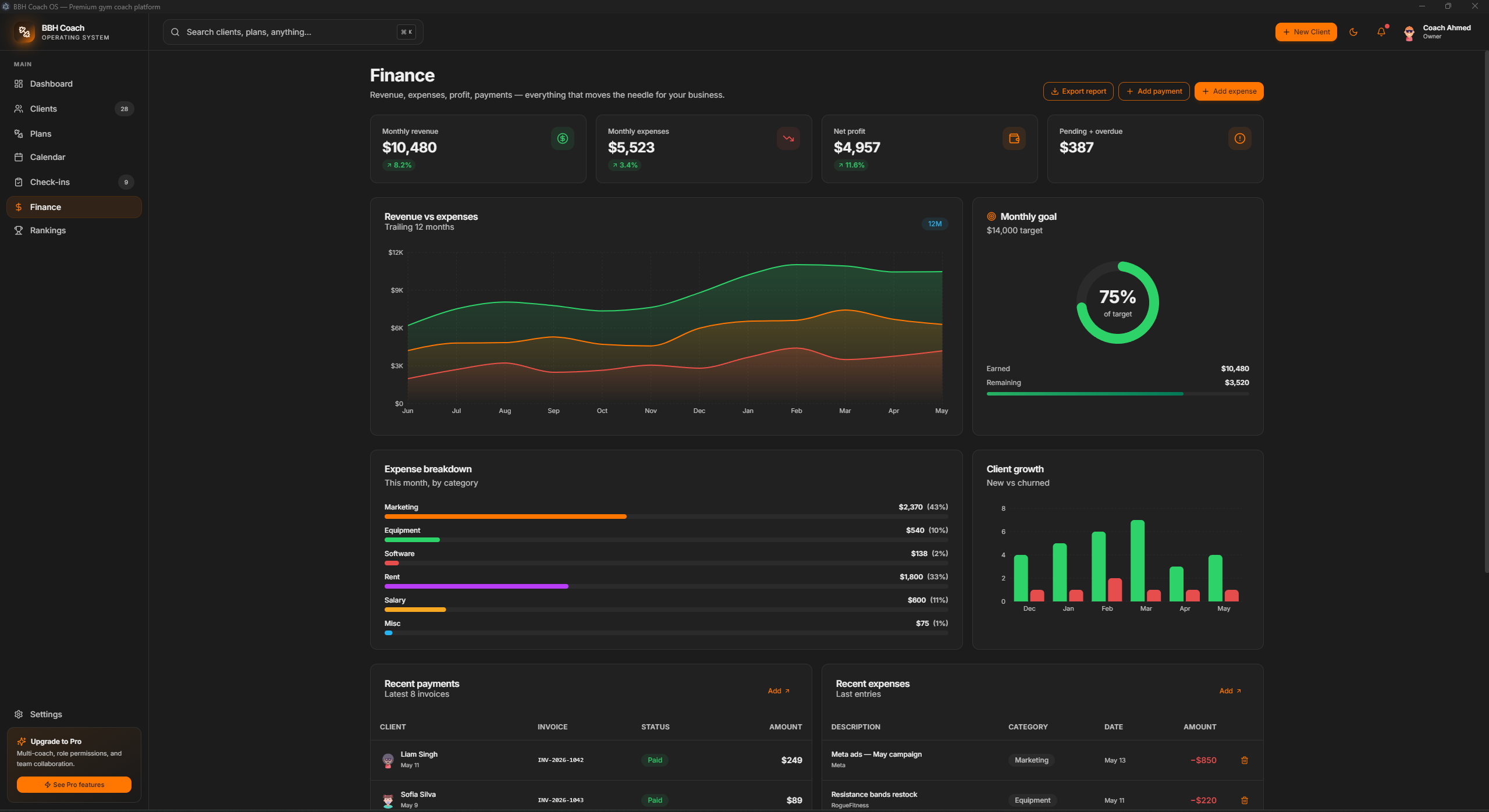
A complete profit-and-loss interface: monthly revenue, cost and net-profit KPIs; a 12-month area chart; a radial monthly-target indicator; expenses grouped by marketing, equipment, software, rent, salaries and other costs; and separate tables for invoices and expenses. Both tables support quick entry, deletion and inline status changes: paid, pending, overdue or refunded.
Payments and expenses in detail
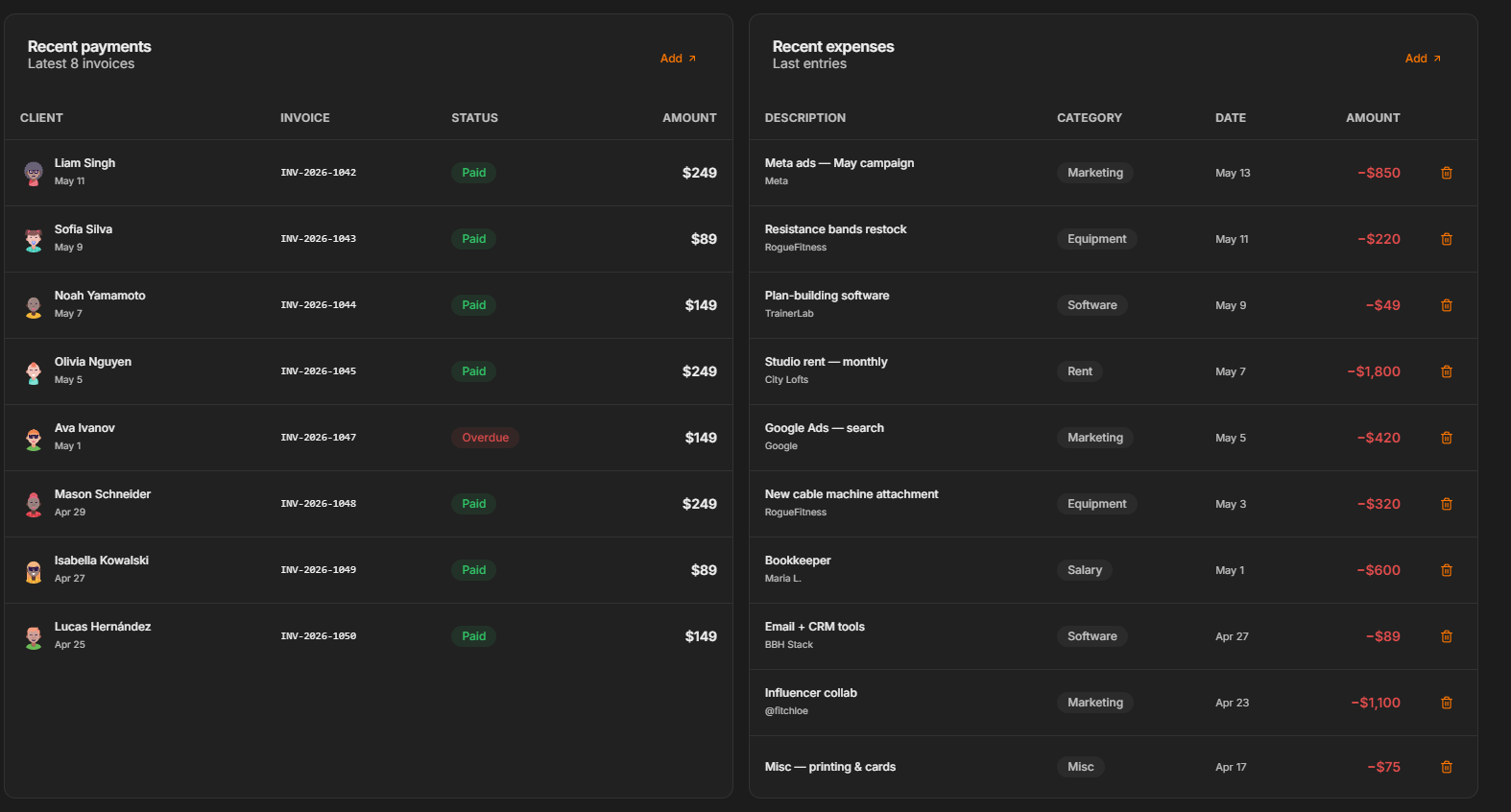
The tables sit side by side: recent invoices with the client, status and amount on the left, and ongoing expenses with the category, supplier and date on the right. Inline actions let the coach make changes without leaving the view.
07 / Rankings
Supporting engagement with a podium and leaderboard
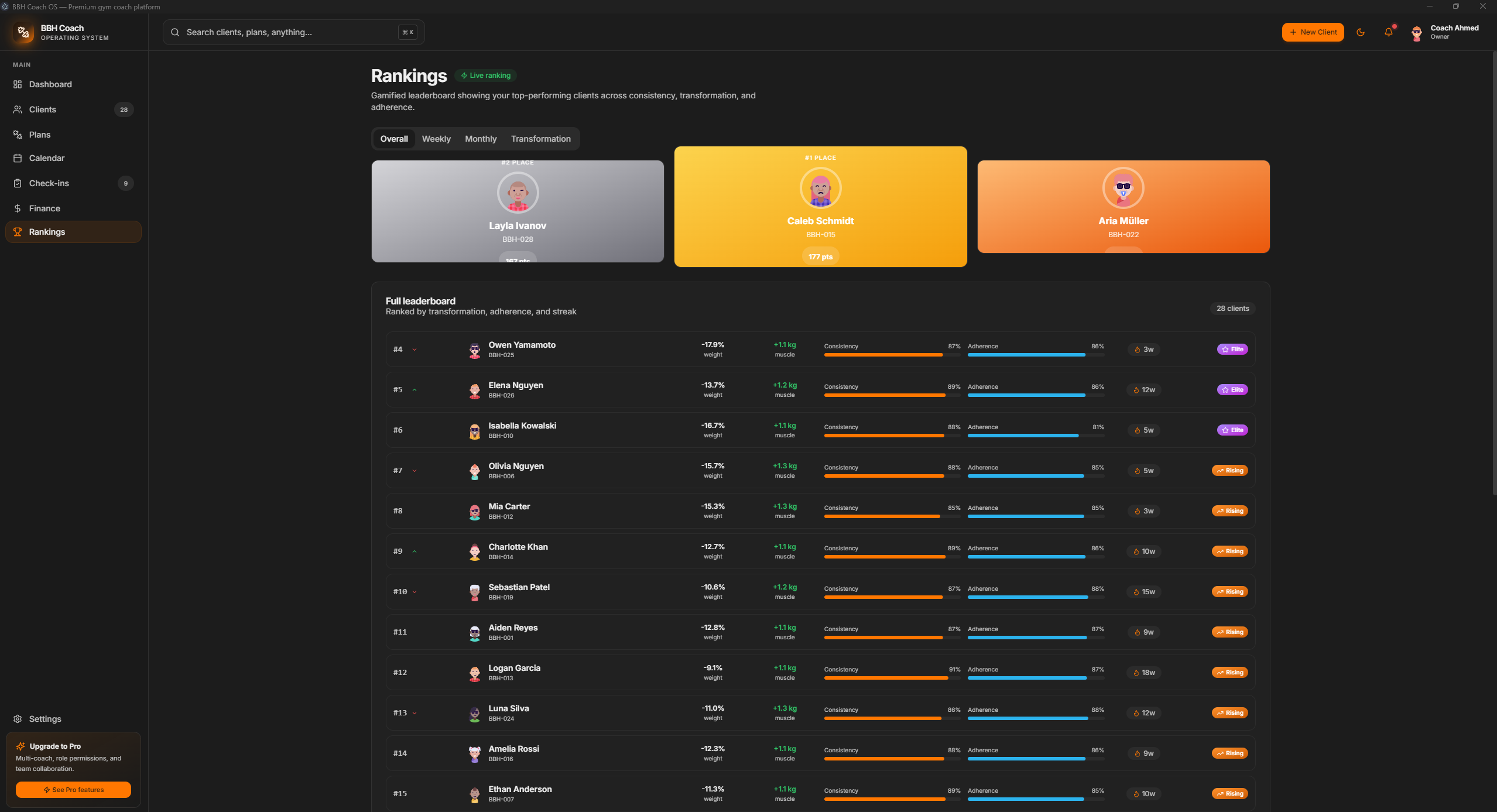
The rankings are designed to help coaches keep members engaged by making progress visible. The page shows a top-three podium and a full leaderboard ranked by transformation, adherence and streak. Tabs switch between Overall, Weekly, Monthly and Transformation. Each row displays the components of its composite score side by side so the ranking can be understood.
Under the Hood
How BBH Coach OS is built
A standalone Next.js server runs as a child process inside an Electron shell, packaged into a single Windows installer. All application state stays on the device, with no account, cloud service or network connection required for the core app.
-
Shell
Electron 33
The main process starts the Next.js server, waits for its health check and loads it in a BrowserWindow without browser chrome.
-
Web
Next.js 15 + TypeScript
App Router, strict TypeScript, Tailwind with CSS variables, Framer Motion for transitions and Recharts for charts.
-
State
Zustand + localStorage
A single store with persistence middleware. Hydration runs after mounting through a StoreHydrator provider, avoiding server-rendering mismatches.
-
Database
Curated Seed Data
Approximately 40 foods and 50 exercises are included, based on an actual BuiltByHima plan and common foods used in fitness meal plans.
-
Import
SheetJS
The XLSX parser identifies meal-plan and workout layouts from their columns and maps them directly into the weekly structure.
-
Packaging
electron-builder
An NSIS installer and a portable build (~156 MB), with optional code signing. The build works without an external signing infrastructure.
Screens
Every application view
Click a preview to open the image at full resolution.